










© 2025 ideal.shop All rights reserved.
Ugyldige tegn i feed
Et produkt/varefeed kan ikke håndtere alle typer tegn, som eksisterer. Derfor kan du opleve, at dit feed viser en kort fejlbesked i stedet for en liste af varedata.
(se fejlbeskeden og information om problem-varen ved at åbne feedet i din browser)
Disse specialtegn som kan skabe problemer kommer typisk når man kopierer og indsætter tekst fra andre kilder (word dokumenter, andre hjemmesider osv.) i en varetekst.
Herunder vises et eksempel på et specialtegn som kan skabe problemer. Slet tegnet ligesom normalt, når du vil slette et helt almindeligt bogstav, og gem så varen.
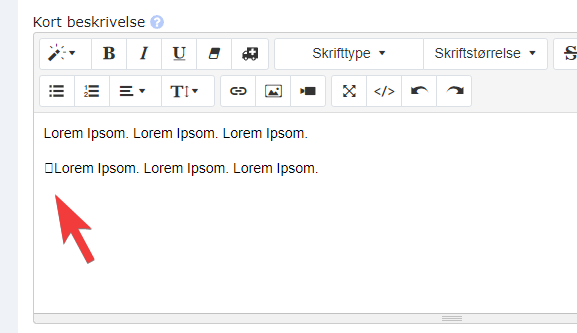
Det er muligt at din browser ikke viser specialtegn som herover. Hvis det er tilfældet, så kan du prøve at vise HTML versionen af teksten, og se om specialtegnet er synligt.
Hvis du fortsat har problemer med at finde problemet, så kan du fjerne formateringen af teksten og se om det hjælper. Og endelig kan du prøve at fjerne hele teksten (midlertidigt) for at se, om problemet overhovedet er i tekstfeltet.