










© 2025 ideal.shop All rights reserved.
Dinero - sådan opsætter og bruger du integrationen
Overfør dine webshop-ordrer til Dinero, enten automatisk eller ved at udvælge de ordrer som du vil overføre.
Opsæt integrationen
Først skal du have Dinero Pro, altså det betalte abonnement hos Dinero. Når du derefter er logget ind hos Dinero, så tryk på "Integrationer" i venstre menu og opret ny API nøgle.Firma ID kan ses nede til venstre, når du er logget ind hos Dinero.
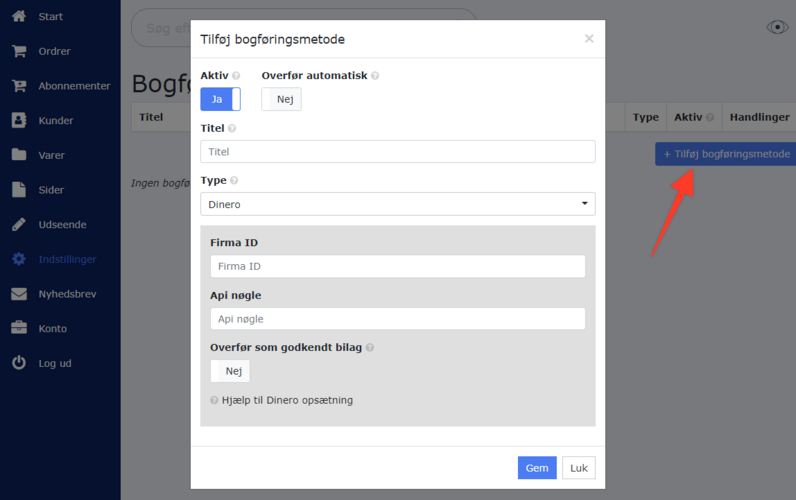
Nu kan du gå til "Indstillinger > Integrationer > Bogføringsmetoder" i din webshop administration og oprette Dinero i din webshop.
Hvordan virker det?
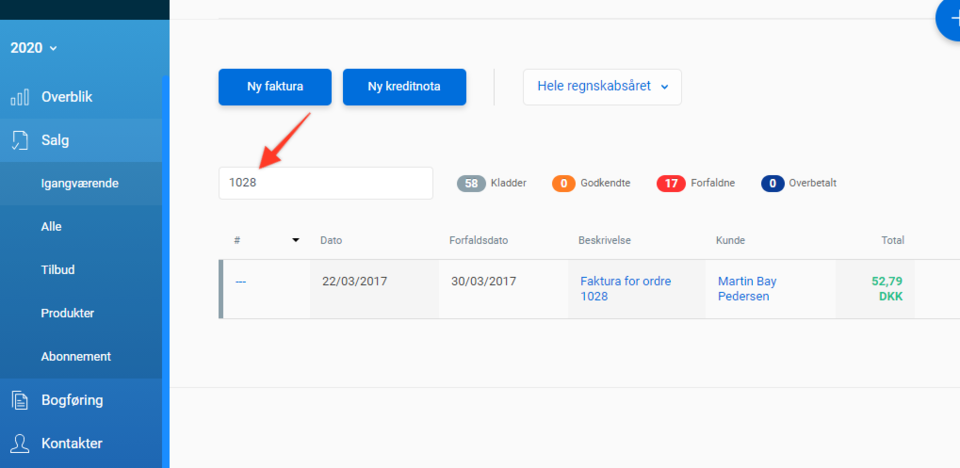
Dine ordrer kan nu overføres til Dinero. Enten ved at trykke på funktions-knappen ud for din ordre, eller ved at indstille integrationen til at overføre automatisk.Når en ordre overføres til Dinero kan den findes under "Salg". Har du svært ved at finde den overførte ordre, så prøv at søge efter ordrenummeret hos Dinero.
Ofte stillede spørgsmål
Hvorfor er der forskel på bilagsnummeret i min webshop og i Dinero?
Det er en misforståelse at bilagsnumre skal være ens i to systemer. Det er ikke et krav, og det er meget svært at opnå. Du bør vælge hvilket system du vil bruge til at sende fakturaer til kunder samt hvilket system du vil bruge til dit regnskab. Og så holde fast i det, så der ikke opstår situationer hvor en kunde eksempelvis modtager den samme faktura fra begge systemer (med forskellig fakturanummer).Ordrenummeret fra shoppen vil altid blive tilføjet dit bilag i Dinero som overskrift og som kommentar.
Bibehold samme fakturanummer (anbefales ikke)
Hvis du sætter integrationen til at låse dit bilagnummer, og du overfører afsluttede ordrer, vil systemet forsøge at oprette det samme fakturanummer hos Dinero, som bilaget har i webshoppen. Hvis fakturanummeret allerede er i brug på din Dinero konto, så vil systemet melde om fejl, og eventuel automatisk overførsel vil blive stoppet indtil problemet er løst.Skal jeg sende en faktura til kunden fra min webshop eller fra Dinero?
Det er helt op til dig selv. Men vi anbefaler at sende fakturaer fra webshoppen, med mindre du ønsker at bruge specifikke muligheder som kun findes hos Dinero. Ved at bruge fakturasystemet i webshoppen til at sende til dine kunder, bliver håndteringen af ordrer nemmere og hurtigere.Kan Dinero håndtere salg til udlandet?
Ja, Dinero kan håndtere udenlandsk valuta og individuel momssats.Hvorfor står salg som ubetalt i Dinero?
For at registrere betaling / afstemning for salgsordrer, er det vigtigt at du indtaster dine beholdningskonti i integrationen.Find muligheden og mere information der hvor du redigerer din Dinero integration.
Relateret:
- VOEC (eksport til Norge) og Dinero
- Dinero - automatisk overførsel er stoppet